Best Password Manager for Seniors: Keep Your Accounts Secure
NordPass: Simplified Password Manager for Seniors
As we age, managing the multitude of online accounts and passwords can become a daunting task. NordPass is a password manager for seniors that aims to alleviate this frustration, especially for those who may find themselves frequently resetting passwords. Let’s explore how NordPass can help seniors save time and reduce stress by securely managing all their passwords.
Why NordPass is The Perfect Password Manager for Seniors
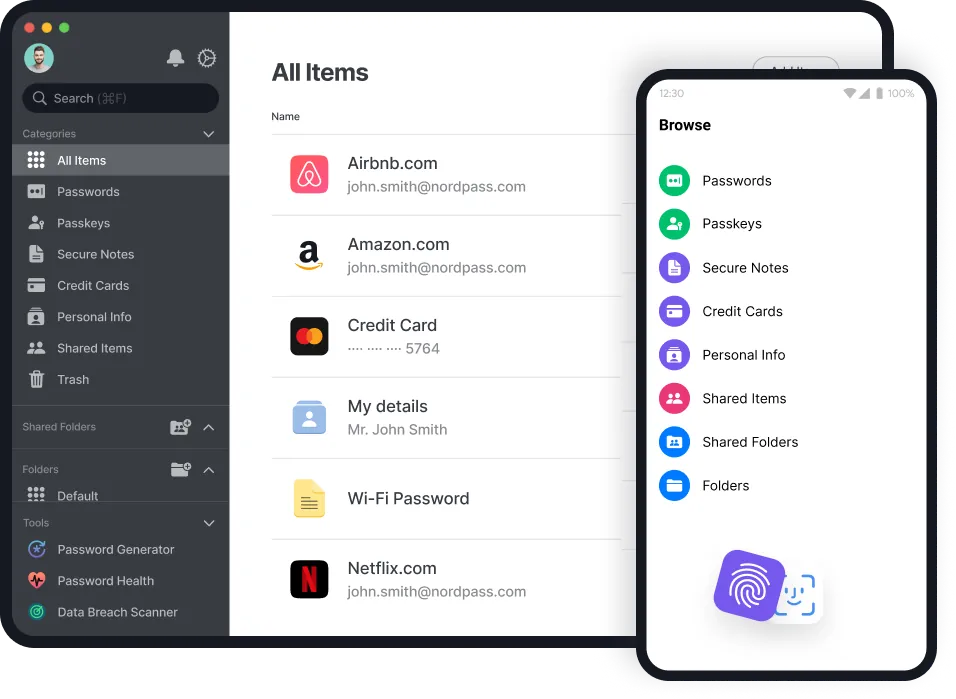
Ease of Use: NordPass is designed with a user-friendly interface, making it simple for seniors to store and retrieve passwords. It works seamlessly across various devices, including desktops, smartphones, and tablets. Once installed, NordPass can automatically fill in login details, saving time and effort when accessing different accounts.
Security Features: Security is a major concern when it comes to managing passwords. NordPass uses advanced encryption methods, ensuring that your passwords are safe from hackers. Additionally, NordPass operates on a zero-knowledge architecture, meaning that even NordPass cannot see your stored passwords.
Password Generation and Storage: One of the common frustrations for seniors is creating and remembering strong passwords. NordPass can generate complex passwords that include special characters, uppercase letters, and numbers, ensuring that all your accounts are secure. These passwords are then stored in an encrypted vault, accessible only to you.
Data Breach Monitoring: NordPass includes a data breach scanner that checks if any of your email addresses or passwords have been compromised in a data breach. This feature provides peace of mind, knowing that you are promptly alerted if your information is at risk.
Emergency Access and Password Sharing: In case of emergencies, NordPass allows you to share access with trusted family members. This is particularly useful for seniors who might need assistance managing their online accounts from time to time.
Overcoming Common Password Challenges with Password Manager for Seniors
Unique Passwords for Every Account: Remembering unique passwords for every account is a significant challenge. NordPass not only generates these passwords but also remembers them for you. No more writing down passwords in notebooks or trying to recall them from memory.
Auto-Fill and Auto-Lock: NordPass’s auto-fill feature means you don’t have to type out passwords each time you log into an account. Just click, and NordPass fills in the credentials. Additionally, the auto-lock feature ensures your password vault locks itself after a period of inactivity, adding an extra layer of security.
Accessibility: With NordPass, you can access your passwords anytime, anywhere. Whether you’re using a computer, smartphone, or tablet, your password vault is synced across all your devices, making it easy to stay organized and secure.
Getting Started with NordPass
- Installation: Download and install NordPass on your preferred device. It’s available for Windows, Mac, Linux, Android, and iOS.
- Create a Master Password: This will be the only password you need to remember. It unlocks your entire password vault.
- Add Your Passwords: You can manually enter your passwords or import them from another password manager or a spreadsheet.
- Set Up Auto-Fill: Enable the auto-fill feature in your browser to make logging into websites effortless.
- Monitor Security: Regularly check the data breach scanner to ensure none of your passwords have been compromised.
Final Thoughts
For seniors, managing numerous online accounts and passwords can be overwhelming. NordPass simplifies this process by securely storing and managing your passwords, ensuring you never have to worry about forgetting them again. Its user-friendly design, robust security features, and convenience make it an ideal tool for seniors looking to navigate the digital world with confidence.
If you’re tired of constantly resetting passwords and want a reliable solution, give NordPass a try. It’s more than just a password manager for seniors; it’s a tool that brings peace of mind and security to your online life. Click below to try Risk Free. Don’t forget to sign up to our email newsletter to get exclusive senior discounts!

I’m Anita McIsaac, a 36-year-old bank teller from Kansas who enjoys managing SeniorsDeal.com in my spare time. Married with a 13-year-old son, I cherish family game nights and weekend soccer matches. My passion is helping seniors make informed choices, aiming to make retirement smoother and more enjoyable. I love connecting with our readers and sharing practical advice.